|
Name:
Remote Control for All TV
|
|
|
Version:
5.4.7
|
Price:
Free
|
Remote Control for All TV: Your Universal TV Companion
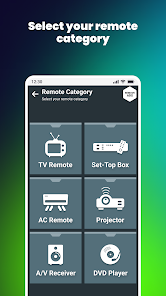
Transform your smartphone into a versatile, all-in-one remote control for a wide range of television brands and set-top boxes. This app aims to eliminate the clutter of multiple physical remotes by offering a unified, intuitive control center right from your Android device.
Latest Updates
- Expanded device compatibility database for newer TV models.
- Enhanced screen mirroring stability and connection speed.
- Redesigned user interface for easier navigation and a more modern look.
- Added support for popular streaming devices and IPTV boxes.
- Bug fixes and performance improvements for a smoother user experience.
Description
Remote Control for All TV is a comprehensive application designed to give you complete command over your entertainment system. By leveraging both Infrared (IR) blaster technology and Wi-Fi connectivity, the app can communicate with a vast array of televisions, from classic IR models to modern smart TVs. Beyond simple remote emulation, it integrates screen mirroring capabilities, allowing you to cast photos, videos, and even your entire phone screen directly to a compatible TV, creating a seamless multimedia hub.
Key Features
- Universal Compatibility: Works with thousands of TV brands including Samsung, LG, Sony, Panasonic, Vizio, and more, as well as devices like Android TV boxes and Fire TV Sticks.
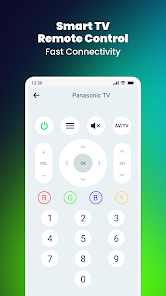
- Dual Control Methods: Uses your phone's IR blaster for traditional TVs or Wi-Fi for smart TVs and streaming devices.
- Screen Mirroring & Casting: Wirelessly display your phone's screen or media files on the big screen for a shared viewing experience.
- Customizable Remote Layout: Personalize the on-screen remote with your most-used buttons for quick access.
- Program Guide & Smart Search: Some versions integrate an electronic program guide (EPG) and voice search functionality to find content faster.
- No Root Required: The app is designed to function on compatible hardware without needing root access.
Pros and Cons
Pros:
- Extremely convenient, replacing multiple physical remotes with a single app.
- The inclusion of screen mirroring adds significant value beyond a simple remote.
- User-friendly interface that is generally easy to set up and navigate.
- Regular updates that improve functionality and add support for new devices.
Cons:
- IR Blaster Dependency: For non-smart TVs, the app requires a phone with a built-in IR blaster, which is not available on all modern smartphones.
- Wi-Fi control can sometimes be finicky, requiring the phone and TV to be on the same network and may need specific setup steps.
- The free version is often supported by advertisements, which can be intrusive.
- Advanced features like detailed program guides may be locked behind a premium paywall.
Review Summary
Remote Control for All TV is a powerful and highly practical tool for anyone looking to simplify their home entertainment setup. Its core strength lies in its universality and the added bonus of screen mirroring. While its effectiveness is partially dependent on your phone's hardware (specifically the presence of an IR blaster), for users with compatible devices, it delivers on its promise of being a comprehensive remote solution. The occasional connectivity hiccup with Wi-Fi and the presence of ads are minor drawbacks in an otherwise robust and highly useful application. It is highly recommended for individuals who have lost a remote, want to reduce clutter, or frequently use screen mirroring features.